

How to Reduce Printing Costs Without Sacrificing Quality
A 24-piece apparel order can look profitable when you quote it by the shirt. Then production starts. You lose time aligning artwork, waste transfer film during setup, reject a few blanks after a profile misfire, and run the job again because the first batch doesn't match the approved sample. The invoice still shows the quoted unit price, but your margin has already taken the hit.
That's why how to reduce printing costs starts with landed job economics, not the cheapest ink bottle or the lowest advertised price per page. You need to see what each order consumes in setup time, make-ready waste, substrate, reprints, labor, and machine capacity. The shop that measures those leaks can often save more by fixing workflow than by switching suppliers.
Why Per-Shirt Price Is Misleading
A 24-piece apparel run can look profitable at the quoted shirt price, then lose margin before delivery. The landed cost per job includes artwork preparation, setup, test prints, film, ink, blank garments, press time, operator time, packaging, reprints, and waste. Two orders with the same unit price can produce very different margins because one runs cleanly while the other creates stops, adjustments, and rejected pieces.
A large full-color design may need several test transfers before the profile, white layer, and garment combination behave correctly. A smaller design on a stable substrate may need little adjustment. Price both jobs only by the finished shirt, and the first job subsidizes the second.
Practical rule: Track the cost of getting the first good piece, not only the cost of producing the final pieces.
Start with the job, not the consumable
Audit every order through four questions:
- Setup: How much film, paper, ink, and operator time disappear before production stabilizes?
- Substrate: Does the garment or media exceed the design's actual requirements?
- RIP discipline: Are white ink choke, ink limits, nesting, resolution, and color profiles changing from job to job?
- Throughput: How many productive minutes disappear while staff wait, clean, reload, troubleshoot, or remake work?
Per-page or per-shirt price still matters, but it cannot explain the cost of a color-matching cycle or substrate rejection. The job-fit economics approach compares reprints, scrap, throughput, labor, and routing, rather than judging a method by page price alone. A cheaper method can cost more after waste and handling are included. the job-fit approach to operational cost analysis.
RIP and profile discipline deserve particular attention on apparel runs. Lock approved settings by garment and process, then require a documented reason for changes to white ink, ink limits, nesting, resolution, or color profiles. That keeps each job tied to a repeatable production setup instead of making every order a new calibration exercise.
For office environments, the same landed-cost logic applies at larger scale. One industry guide reports that organizations commonly spend 3% to 4% of annual revenue on imaging and printing, while managed print programs may reduce document-related costs by 20% to 30%. A business earning $3 million in annual revenue may spend roughly $60,000 to $90,000 on printing-related expenses, with possible savings of $18,000 to $27,000 when processes improve and waste falls. Review the managed print cost example.
Start with one question: “What did this order consume from quote to delivery?” That answer shows whether the fix belongs in setup, routing, profiles, labor, or the selected print method.
Mapping Where Your Printing Dollars Leak
A job can look profitable on the quote and still lose money before delivery. Review the past 30 days to find where that happens. Pull job tickets, production notes, supplier invoices, and POS records. Specialized software can wait. Consistent labels for waste, reprints, setup time, and downtime cannot.
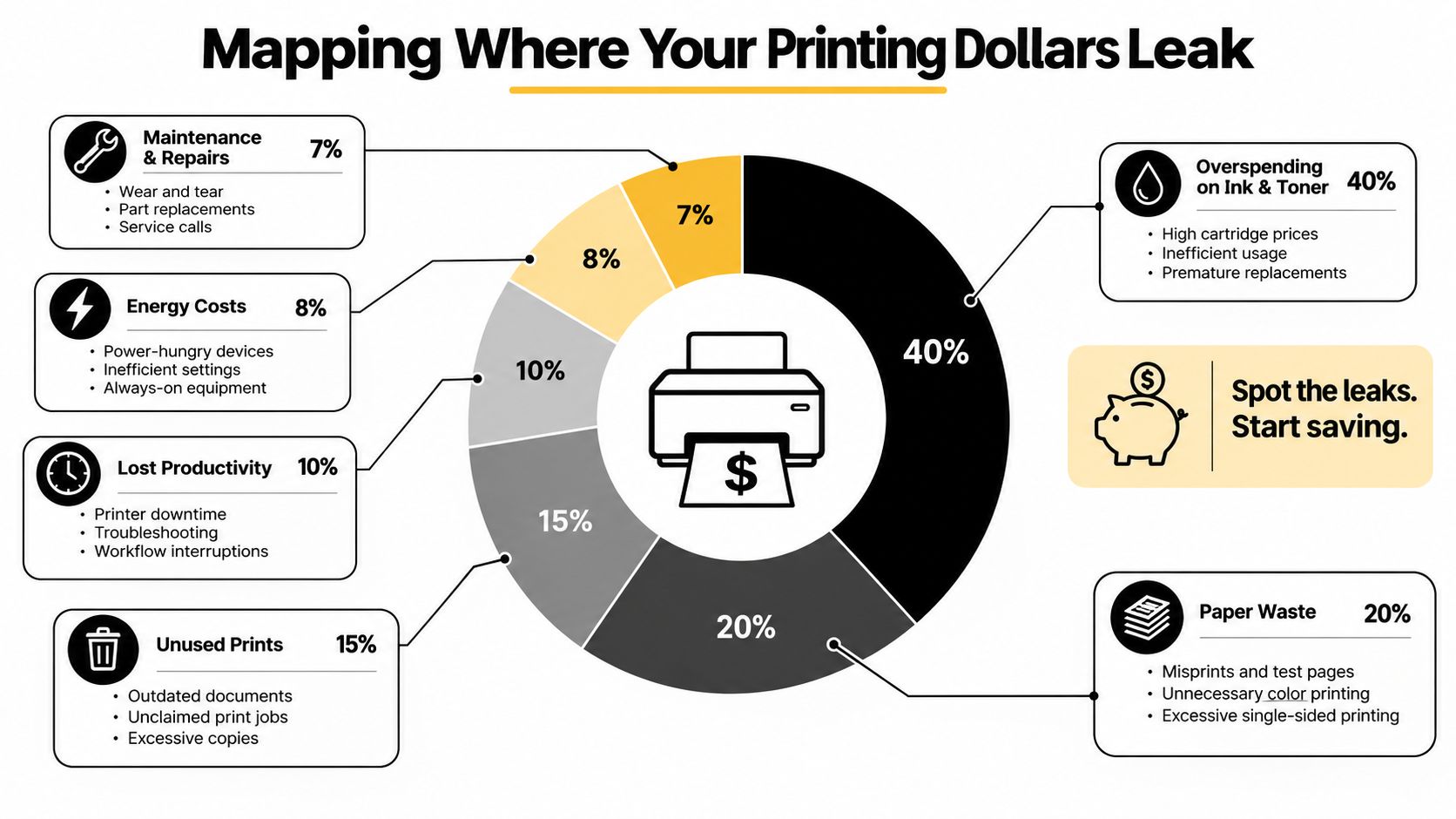
Four places to look first
Setup and make-ready waste is usually the first leak to inspect. Record every test sheet, failed transfer, alignment adjustment, and discarded garment. For film-based apparel work, calculate wasted film by dividing discarded film by film issued to the job. Build a baseline from your own equipment, then focus on the jobs and operators with the highest loss.
Ink and substrate consumption requires job-level tracking. Compare media issued with media used, then separate design-driven consumption from avoidable waste. A large white underbase, heavy color coverage, or a poorly matched garment can raise the landed cost even when the artwork looks simple. Judge each method by the complete job, including setup, reprints, labor, and throughput, rather than by per-page price.
Labor and reprints stay hidden when operators record only the finished quantity. Add a reprint field to every ticket and record the cause, such as an artwork error, profile mismatch, press application issue, or substrate defect. The U.S. Department of Homeland Security's evaluation projected a 6% cumulative reduction in printing and reproduction costs over FY2014 to FY2016, worth more than $2.9 million. It also found that 11 of 14 components reduced printing costs, with 9 reducing them by more than 20%. Read the DHS printing-cost evaluation summary.
Equipment downtime belongs on the same ticket. Log idle press hours, failed nozzle checks, cleaning cycles, jams, RIP delays, and supply shortages. Short interruptions can consume productive capacity even when the machine appears busy.
Turn records into a priority list
At month-end, rank each leak by total dollars, not irritation:
- Reprints and rejected substrates, which consume materials and labor twice.
- Make-ready and setup waste, especially on short runs.
- Idle equipment time, when it prevents higher-margin work.
- Consumable pricing, after usage is under control.
This order keeps purchasing negotiations in perspective. A small discount will not offset uncontrolled waste. Office guidance also warns that estimated print spending can undercount actual costs by as much as 40%, making measured job tickets more reliable than assumptions. Review this print-cost measurement guidance from Offix.
Cutting Waste in Your Production Workflow
The fastest workflow savings usually come from repeatability. Group similar jobs, use one validated color set, and stop allowing every operator to invent a new RIP recipe. A stable process reduces decisions, and fewer decisions mean fewer opportunities for inconsistent output.
Build a controlled production path
Batch jobs by printer, substrate, ink set, and finish requirement. If several black-cotton orders use the same artwork treatment, run them together after one profile check instead of recalibrating for each ticket. Lock the ICC profile to the exact printer, substrate, and ink combination. Name profiles clearly, for example Printer_Substrate_Ink_Date, so an operator can identify the correct option without guessing.
Use a pre-press checklist before anyone sends a file:
- Artwork: Confirm dimensions, transparency, garment color, and approved proof.
- RIP: Confirm resolution, white-layer behavior, choke, ink limits, and mirror settings.
- Nesting: Fill available film space with compatible designs before sending the job.
- Output: Verify the first article against the approved reference before releasing the batch.
Set minimum and maximum ink limits in the RIP rather than relying on default settings. The right limit depends on the printer, ink, film, and curing process, so validate it with your own test chart. Over-inking can create drying, powdering, adhesion, and color problems. Under-inking can force reprints because the transfer lacks density.
Compare the workflow, not just the price
The table below is a planning tool, not a universal promise. Replace the entries with your own 30-day ticket data.
| Workflow Tactic | Setup Time Saved | Waste Reduction | Estimated Cost Impact |
|---|---|---|---|
| One validated ICC profile for a common substrate | Qualitative improvement | Fewer color-matching tests | Lower labor and reprint cost |
| Nesting compatible designs | Less repeated loading | Less unused film | Lower film cost per finished piece |
| Batch production by garment and color set | Fewer repeated setups | Fewer test pieces | Lower setup cost across the run |
| Pre-press approval checklist | Less troubleshooting | Fewer artwork-driven reprints | Protects labor and materials |
| RIP ink-limit controls | More stable output | Less over-inking and reject risk | Lower consumable and remake cost |
A 50-piece black-cotton run is a good internal test. Produce one batch using separate setup checks for each order, then compare it with a grouped run using one approved profile, nested film, and a single first-article approval. Don't invent savings before the test. Record setup minutes, film issued, test pieces, finished pieces, and reprints for both approaches.
Operational cost guidance from SelfServe offers useful context for reviewing the wider business process, not just the print queue. Use its resource on how to cut costs in ecommerce operations when you're connecting production waste with fulfillment, inventory, and order-handling costs. For a print-specific workflow reference, document your standard operating procedure alongside this production efficiency improvement guide.
Disciplined workflow beats a single equipment upgrade because it improves every compatible job. A new printer can't rescue inconsistent profiles, poor nesting, or unrecorded reprints.
Choosing Print Methods That Lower Per-Unit Costs
No print method wins every apparel order. The right choice depends on setup burden, artwork complexity, garment compatibility, color count, run length, and how much labor your shop can absorb.
DTF usually fits short and medium runs with detailed, full-color artwork. Transfers move much of the printing and curing work into a controlled step, which can reduce in-house make-ready on small orders. Screen printing can become cheaper on larger runs when colors are limited and the screen setup is spread across many pieces. DTG suits direct-to-garment detail and one-off personalization, but pretreatment and garment handling can add labor. Sublimation is efficient for compatible polyester products and all-over designs, but it isn't a universal option for cotton apparel.
The table below deliberately avoids invented dollar amounts. Put your own ink, film, labor, setup, and reprint values into the formula.
| Print Method | Setup Cost | Cost Per Unit, 24 pcs | Cost Per Unit, 144 pcs | Best Run Size |
|---|---|---|---|---|
| DTF | Low to moderate, depending on transfer source and application | Often attractive when setup must be spread across a short run | Compare transfer price and application labor against batch alternatives | Short to medium runs, detailed artwork |
| Screen printing | Higher setup because screens and registration must be prepared | Setup can weigh heavily on the unit cost | Setup spreads across the run | Larger runs with limited colors |
| Sublimation | Low setup for suitable artwork and polyester media | Efficient when garment and design fit the process | Efficient for repeatable polyester production | Polyester apparel and products |
| DTG | Moderate setup with pretreatment and garment handling | Useful for detailed short runs | Compare pretreatment and print time at volume | Personalization and direct garment work |
For an actual 24-piece comparison, calculate:
(setup labor + consumables + application labor + expected reprint cost) ÷ finished pieces
Then repeat the same calculation for 144 pieces. That exposes the crossover without pretending every shop has the same wages, equipment, or supplier pricing.
Use a simple method decision
- Stay with your current method when the artwork, substrate, and run length already match its strengths and your reprint rate is controlled.
- Add DTF when short apparel runs create repeated screen setup, detailed artwork makes screen work slow, or you need to separate transfer production from garment application.
- Choose screen printing when volume is high, color count is limited, and the screens can run repeatedly without major changes.
- Choose sublimation when the garment is suitable polyester and the design benefits from dye penetration.
- Choose DTG when direct placement, personalization, or fine detail matters more than maximum throughput.
The best process isn't the one with the lowest advertised unit price. It's the one that produces the required quality with the fewest setup minutes, rejects, and reprints.
Smarter Purchasing of Inks, Films, and Transfers
Purchasing gets cheaper when you negotiate from measured usage. Don't ask a supplier for a lower bottle price while your shop is wasting ink through over-inking, expired stock, or failed color matching. First calculate landed cost, including product price, freight, tariffs where applicable, minimum-order penalties, storage, and the cost of unusable inventory.
Negotiate the unit that reflects reality
Ask for ink pricing by volume, film pricing by roll length and usable area, and transfer pricing tied to a realistic annual commitment. A lower transfer price isn't a saving if the minimum order forces you to buy designs you won't sell. Likewise, a long roll isn't automatically cheaper if your nesting pattern leaves substantial unused film.
Score each supplier on:
- Delivery consistency: Does the supplier meet the lead time you plan around?
- Batch stability: Do color and coating remain consistent between orders?
- Returns: Can you recover value from defective or incompatible material?
- Technical support: Does someone respond when adhesion, curing, or color issues appear?
- Storage life: Can you consume inventory before it becomes unreliable?
- Order flexibility: Does the minimum quantity fit your actual demand?
Color drift creates a particularly expensive chain reaction. You may consume extra film and ink while matching a previous order, then lose more time adjusting a profile that was correct for the earlier batch. Record lot numbers on job tickets so you can connect defects to a specific consumable batch.
A supplier comparison spreadsheet should show product cost, freight, usable yield, minimum quantity, defect history, and average delivery time. Review it by finished piece or finished square inch, not by carton.
The cheapest input is the one that arrives reliably, runs predictably, and doesn't create a second job.
For a broader procurement framework, cut sourcing costs with data provides a useful way to connect purchasing decisions with actual consumption and supplier performance. For DTF-specific pricing considerations, compare your measured usage with this DTF ink price guide.
Don't overlook paper and duplex defaults in office printing. A European university sustainability guide says duplexing can save up to 50% of paper costs, while a large-firm example in the same guidance describes annual savings of 600,000 euros when each employee uses double-sided copying for just one sheet per week. A U.S. government evaluation also recorded a 4.2 to 7.4 percentage-point increase in duplex printing after a default-setting intervention. Review the duplex printing and paper-cost guidance.
Maintenance Habits That Protect Long-Term Savings
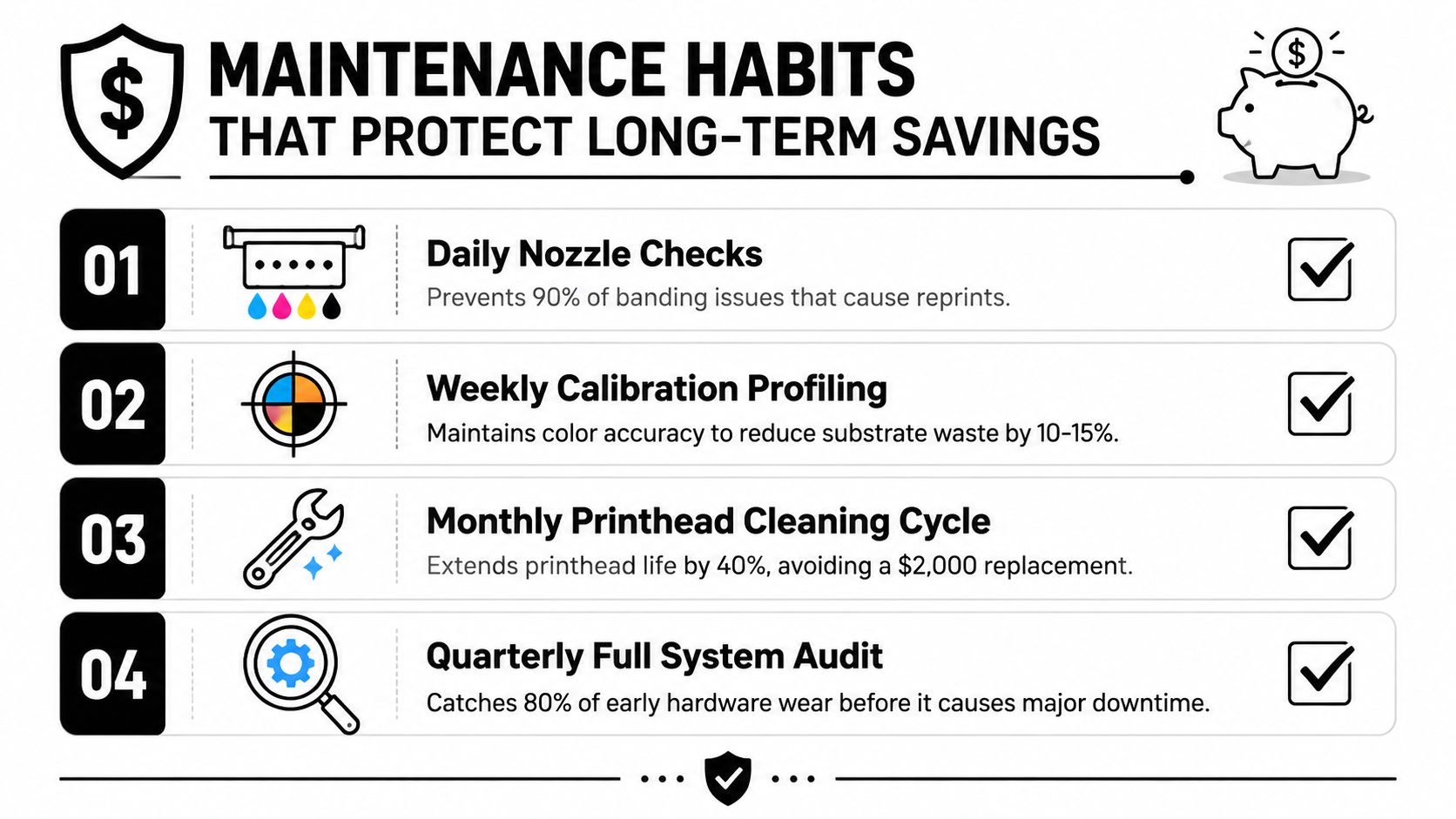
Skipping maintenance doesn't remove cost. It moves cost into reprints, downtime, damaged printheads, emergency service, and missed delivery windows. Inkjet heads, cap stations, dampers, wipers, and RIP calibration all affect whether the first production piece is usable.
Put maintenance on a fixed rhythm
Daily checks should confirm nozzle performance, ink flow, film or media loading, and visible contamination. A short check catches problems before a full run turns a small defect into a large remake.
Weekly work should include a controlled test print, RIP calibration verification, waste-bin review, and inspection of the cap station, wiper, dampers, and ink lines. Compare the result with a known reference instead of trusting memory.
Monthly work should review reprint causes, profile drift, consumable lot changes, and the condition of cleaning components. Revalidate profiles against the substrates you use, not an ideal media sample that rarely reaches production.
Quarterly work should examine recurring downtime, service history, head alignment, color consistency, and whether the current maintenance schedule still matches production volume.
Track a few owner-level KPIs in five minutes each week:
- First-pass acceptance: How often does the first approved piece pass without adjustment?
- Reprint reason: Which defect category appears most often?
- Waste issued versus finished: Are film, paper, ink, and blanks moving in the right direction?
- Downtime minutes: Is idle time rising before breakdowns become obvious?
- Profile exceptions: How often do operators bypass the approved profile?
Use a maintenance ROI framework to compare preventive labor with breakdown cost, lost capacity, and replacement exposure. This guide to calculating maintenance ROI can help you structure that comparison.
Maintenance isn't a luxury for high-volume shops. It's production insurance that protects the workflow decisions you already made.
Your 30-Day Plan to Actually Reduce Printing Costs
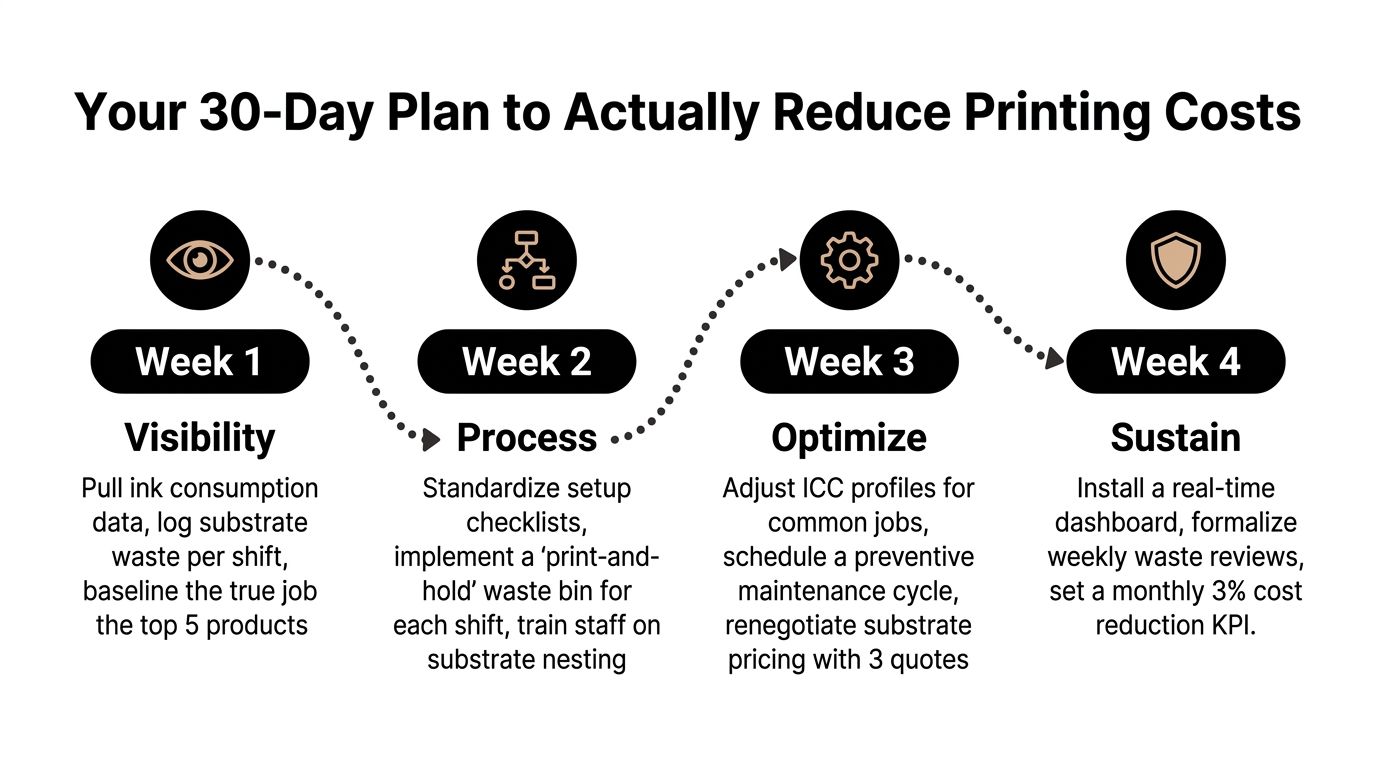
A month is enough to establish control if you measure before changing everything. Assign one owner, use one shared worksheet, and review the numbers at the same time each week.
Week one focuses on visibility
Pull ink, film, transfer, paper, and substrate consumption from recent tickets and invoices. Log waste by shift and record every reprint with a reason. Choose three representative orders, one short apparel run, one repeat job, and one job with complex color or substrate requirements, then calculate their landed cost from setup through delivery.
Don't aim for perfect accounting. Aim for a clear ranking of the leaks that deserve attention.
Week two fixes the workflow
Consolidate RIP color sets for your common printer, substrate, and ink combinations. Enable nesting wherever compatible designs can share a sheet or roll, standardize the setup checklist, and run one batched production test.
Measure setup minutes, first-pass acceptance, film issued, and reprints before comparing the result with earlier tickets. The test matters more than an operator's opinion because it shows whether the change affects your actual jobs.
Week three improves purchasing and method fit
Request comparable quotes from two competing suppliers for the ink, film, paper, and transfers you consume. Compare landed cost, usable yield, delivery reliability, minimum quantities, and defect handling. If apparel orders regularly exceed 50 pieces weekly, evaluate whether a DTF workflow could reduce setup and make-ready pressure, but base the decision on your own job-ticket math rather than a headline price.
Review this guide to improving profit margins alongside your production data so the purchasing decision supports the whole business, not just the consumables line.
Week four hardens the gains
Complete the maintenance work you've been postponing. Inspect dampers, recalibrate printheads, clean capping stations, and verify ICC profiles against a reference target and the substrates used in production. Remove obsolete profiles and label the approved ones clearly.
At the end of the month, publish a one-page scorecard with waste, reprints, setup time, downtime, and landed cost by job type. Review it weekly. The shops that improve margins don't treat cost reduction as a quarterly cleanup. They make waste visible, assign ownership, and correct small deviations before those deviations become standard practice.
Cobra DTF offers DTF transfers for apparel production, including gang-sheet formats that can help combine compatible designs and evaluate transfer economics by job. Visit Cobra DTF to review transfer options and build them into your measured cost-reduction plan.